
深入理解java—Spring Boot如何使用JavaMailSender来发送邮件?
深入理解java—Spring Boot如何使用JavaMailSender来发送邮件?
-
你好,我是小黄,一个爱看书的java程序员,我来回答这个题,谢谢。
Spring提供了非常好用的JavaMailSender接口实现邮件发送,在Spring Boot中也提供了相应的自动化配置。
发送邮件
1,在pom.xml中引入spring-boot-starter-mail依赖:
<dependency>
<groupId>org.springframework.boot</groupId>
<artifactId>spring-boot-starter-mail</artifactId>
</dependency>
2,在application.properties中配置相应的属性:(我这里模拟的是163邮箱给QQ邮箱发送邮件)
spring.mail.host=smtp.163.com
spring.mail.username=邮箱用户名 so****@163.com
spring.mail.password=邮箱密码
spring.mail.default-encoding=UTF-8
3,写发送邮件的测试类
@RestController
@RequestMapping("/mail")
public class MailController {
private final Logger logger = LoggerFactory.getLogger(this.getClass());
@Autowired
private JavaMailSender mailSender;
@RequestMapping("/send")
public void sendMail(){
SimpleMailMessage message = new SimpleMailMessage();
message.setFrom("so***@163.com");
message.setTo("239***@qq.com");
message.setSubject("it is a test for spring boot");
message.setText("你好,我是小黄,我正在测试发送邮件。");
try {
mailSender.send(message);
logger.info("小黄的测试邮件已发送。");
} catch (Exception e) {
logger.error("小黄发送邮件时发生异常了!", e);
}
}
}
4,运行启动类
@SpringBootApplication(exclude = {DataSourceAutoConfiguration.class})
@EnableAutoConfiguration
@MapperScan("cn.yideng.*.dao")
public class DemoApplication {
public static void main(String[] args) {
SpringApplication.run(DemoApplication.class, args);
}
}
5,浏览器运行 http://localhost:8080/mail/send
6,登录163邮箱,在发送箱里查看
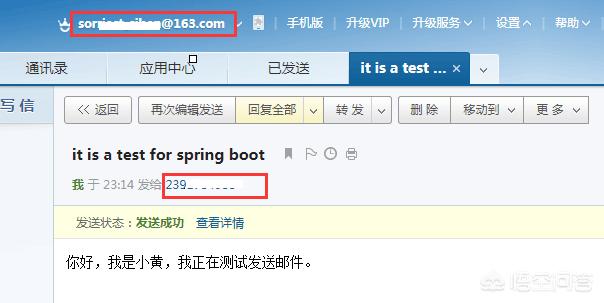
7,登录QQ邮箱,在收件箱里查看
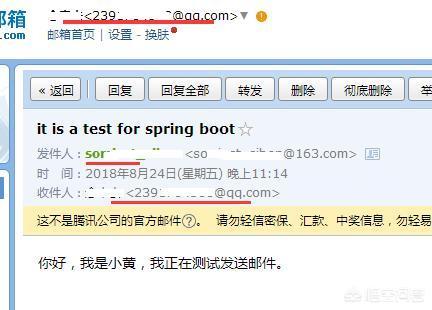
可以看出Spring Boot的starter模块提供了自动化配置,在引入了spring-boot-starter-mail依赖之后,会根据配置文件中的内容去创建JavaMailSender实例,因此我们可以直接在需要使用的地方直接@Autowired来引入 JavaMailSender 邮件发送对象。
当然在实际使用过程中,不会这么简单的,我们可能会要求带上附件、或使用邮件模块等。这时我们就需要使用MimeMessage来设置更复杂的右键内容,下面就来看看怎么实现它。
发送带附件的邮件
测试类 : 还是模拟 163邮箱 给QQ邮箱发送邮件
@RestController
@RequestMapping("/mail")
public class AttachmentsMailController {
private final Logger logger = LoggerFactory.getLogger(this.getClass());
@Autowired
private JavaMailSender mailSender;
@RequestMapping("/att")
public void sendMail() throws MessagingException{
MimeMessage mimeMessage = mailSender.createMimeMessage();
MimeMessageHelper helper = new MimeMessageHelper(mimeMessage, true);
helper.setFrom("so***@163.com");
helper.setTo("239**@qq.com");
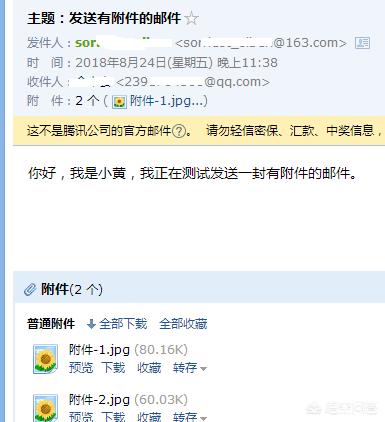
helper.setSubject("主题:发送有附件的邮件");
helper.setText("你好,我是小黄,我正在测试发送一封有附件的邮件。");
FileSystemResource file1 = new FileSystemResource(new File("d:\cat.jpg"));
FileSystemResource file2 = new FileSystemResource(new File("d:\java-1.jpg"));
helper.addAttachment("附件-1.jpg", file1);
helper.addAttachment("附件-2.jpg", file2);
try {
mailSender.send(mimeMessage);
logger.info("小黄的测试带附件的邮件已发送。");
} catch (Exception e) {
logger.error("小黄发送带附件邮件时发生异常了!", e);
}
}
}
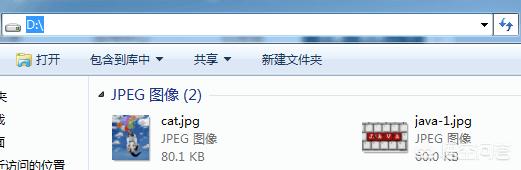
2,需要 在D盘下准备两张图片cat.jpg java-1.jpg
3,浏览器运行 http://localhost:8080/mail/att
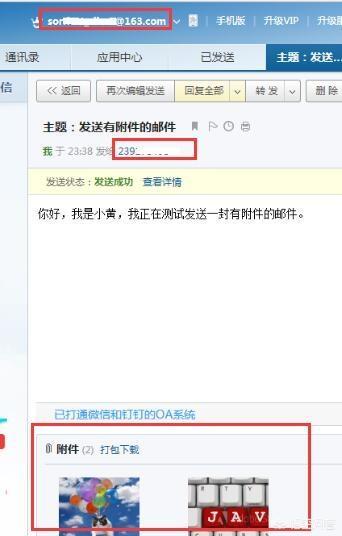
4,登录163邮箱,在发送箱里查看,如下图
5,登录QQ邮箱,在收件箱里查看,如下图
嵌入静态资源的邮件
还有一种是通过嵌入图片等静态资源,可以直接看到图片,而不用从附近中查看具体的图片,来看看吧。
测试类:
@RestController
@RequestMapping("/mail")
public class StaticResourceMailController {
private final Logger logger = LoggerFactory.getLogger(this.getClass());
@Autowired
private JavaMailSender mailSender;
@RequestMapping("/static")
public void sendMail() throws MessagingException{
MimeMessage mimeMessage = mailSender.createMimeMessage();
MimeMessageHelper helper = new MimeMessageHelper(mimeMessage, true);
helper.setFrom("so**@163.com");
helper.setTo("239***@qq.com");
helper.setSubject("主题:嵌入静态资源");
helper.setText("<html><body><img src=\"cid:hello\" ></body></html>", true);
// 注意addInline()中资源名称 hello 必须与 text正文中cid:hello对应起来
FileSystemResource file1 = new FileSystemResource(new File("d:\cat.jpg"));
helper.addInline("hello", file1);
try {
mailSender.send(mimeMessage);
logger.info("小黄的测试嵌入静态资源的邮件已发送。");
} catch (Exception e) {
logger.error("小黄发送嵌入静态资源的邮件时发生异常了!", e);
}
}
}
要特别注意addInline()中资源名称 hello 必须与 text正文中cid:hello对应。
2,需要 在D盘下准备两张图片cat.jpg
3,浏览器运行 http://localhost:8080/mail/static
4,登录163邮箱,在发送箱里查看,如下图
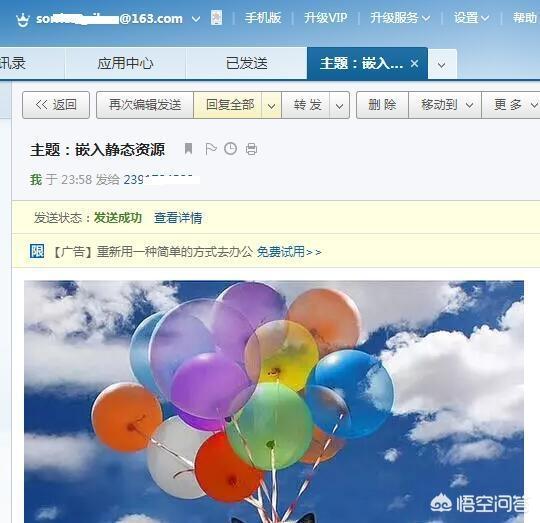
5,登录QQ邮箱,在收件箱里查看,如下图

好了,以上就是Spring Boot使用JavaMailSender发送邮件,谢谢。
以上供参考,如果您觉得有帮助,请帮忙点赞,转发,或者关注我,我是小黄,谢谢。
 2018-08-25 01:16:13
 -
这是我写的Spring boot教程,参考Spring Boot发送邮件资料:
https://blog.yoodb.com/yoodb/article/detail/1427
Spring Boot是由Pivotal团队提供的全新框架,其设计目的是用来简化新Spring应用的初始搭建以及开发过程。该框架使用了特定的方式来进行配置,从而使开发人员不再需要定义样板化的配置。通过这种方式,Spring Boot致力于在蓬勃发展的快速应用开发领域(rapid application development)成为领导者。
2017-11-13 14:54:26
